Mastering Custom Tumblers: A Canva Template Guide
As a designer, I often see small business owners struggle with the technical barrier of product creation. You have a brilliant idea for a custom tumbler line or a unique party favor, but the thought of measuring curves, calculating bleed areas, and wrestling with complex design software is paralyzing. This is exactly why the Tumbler Canva Editable Template Bundle has become an essential asset in my toolkit. It bridges the gap between a creative vision and a professional, production-ready file without requiring you to be a graphic design expert.
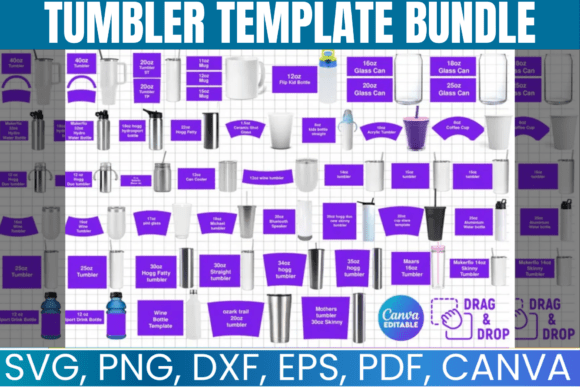
This bundle isn't just a set of static images; it is a comprehensive design system built for versatility. Visually, the templates are clean, structured, and modern. They provide a precise grid system that accounts for the unique taper and seam lines of various drinkware sizes. Whether you are working on a skinny tumbler template or a standard 20oz version, the visual personality of these files is one of efficiency and clarity. They act as a blank canvas that respects the principles of modern typography and layout, allowing your specific brand identity to take center stage without fighting the structure of the file.
Visual Style and The "Blank Canvas" Appeal
The true appeal of this Tumbler Template Bundle lies in its adaptability. In the world of packaging design, the substrate (in this case, the tumbler) dictates the layout. A 40oz tumbler offers a massive vertical canvas, whereas a skinny tumbler requires a more condensed, vertical hierarchy. These templates handle that geometry for you. The style is intentionally minimalist, focusing on the workflow rather than heavy-handed pre-made designs. This allows you to apply your own creative font choices, whether that be a bold sans serif font for a gym-focused water bottle or a whimsical script font for wedding party favors.
Because the files are designed for Canva, they embrace the drag-and-drop ethos. However, unlike lower-quality resources, these templates are structured to ensure your final export is high-resolution. The visual hierarchy is set up so that when you import your design assets, the spacing and alignment guides naturally encourage good design practices. It removes the guesswork regarding where to place a logo or how to center text on a curved surface, which is a common pain point in editorial design and merchandise creation.
Strategic Applications for Entrepreneurs and Creators
For the entrepreneur or crafter, the utility of a Tumbler Canva Editable Template Bundle extends far beyond just making cups. It is a tool for rapid prototyping and marketing. Here is where I see this bundle delivering the most value across different industries:
- Small Business Owners & E-commerce: If you sell on Etsy or Shopify, speed is currency. Using a 30oz tumbler template allows you to mock up seasonal designs in minutes. You can test different colorways and typography styles to see what resonates with your audience before you ever cut a piece of vinyl or print a sublimation sheet.
- Event Planners & Party Favors: Creating party favors is often a logistical nightmare. This bundle simplifies the process for bachelorette parties, baby showers, or corporate events. You can ensure consistency across a 40oz tumbler template for the bride and a skinny tumbler template for the bridesmaids, maintaining a cohesive aesthetic without needing to hire a designer for every variation.
- Brand Strategists & Marketers: Tumblers are high-value promotional items. When pitching a rebrand or a merchandise drop to a client, being able to present a realistic mockup using a premium font and professional layout changes the conversation. It shifts the focus from "what if" to "when can we launch."
The versatility here is key. While the primary focus is drinkware, the skills and assets translate to other cylindrical objects or even flat packaging design projects. The ability to use these files in Cricut Design Space, Silhouette Studio, or Adobe Photoshop means you aren't locked into a single ecosystem, which is vital for a professional workflow.
Designing for Impact: Typography and Readability
When working with curved surfaces, web design rules don't always apply, but the core principles of modern typography remain crucial. A common mistake I see is the use of overly complex handwritten font styles that look beautiful on a flat screen but become illegible when printed on a textured tumbler surface. When using this bundle, I recommend prioritizing readability.
A strong font pairing is your best friend here. Consider pairing a sturdy, bold display font for the main headline (like a name or a slogan) with a clean, legible serif font or sans serif font for smaller details like dates or hashtags. This creates a clear visual hierarchy that guides the eye, even on a skinny tumbler where horizontal space is limited.
Furthermore, think about the texture of the tumbler. If you are doing glitter or textured finishes, a thin, delicate font will get lost. You need a typeface with enough weight to stand up to the physical material. This bundle allows you to experiment with these variables risk-free. You can swap out a commercial font for a different style in seconds to test contrast and legibility before committing to the final production.
Practical Evaluation and Workflow Integration
To get the most out of this resource, you need to approach it with a strategy. Don't just download and start clicking. First, evaluate the specific needs of your project. Are you targeting a demographic that prefers sleek, corporate aesthetics, or are you going for a playful, artisanal vibe? This dictates your choice of typeface and color palette.
Next, utilize the instant download feature to start testing immediately. I recommend opening the templates on a desktop or laptop for the best control, as mobile Canva can be restrictive for precise design work. Check the layers. Good templates are organized, allowing you to isolate elements. Use this to your advantage to build a library of reusable components.
Finally, consider the licensing and commercial aspect. Ensure that the creative font you choose to pair with these templates is cleared for commercial use if you intend to sell the finished product. The template bundle itself is designed for this purpose, providing you with the legal peace of mind to scale your business. By treating this Tumbler Canva Editable Template Bundle not just as a file, but as a production asset, you streamline your workflow, elevate your brand identity, and open up new revenue streams with professional, polished products.