Organize Your Coaching Program with Canva Templates
Running a coaching business involves more than just one-on-one sessions. There’s the client onboarding, the program guides, the worksheets, the checklists, and the constant need to present your material in a way that reflects your professionalism. If you’ve ever found yourself staring at a blank screen, trying to piece together a cohesive set of materials, you know how time-consuming and frustrating it can be. That’s where a well-designed set of templates becomes invaluable—not just as a shortcut, but as a foundation for a consistent and polished client experience.
A Practical Solution for Modern Coaches
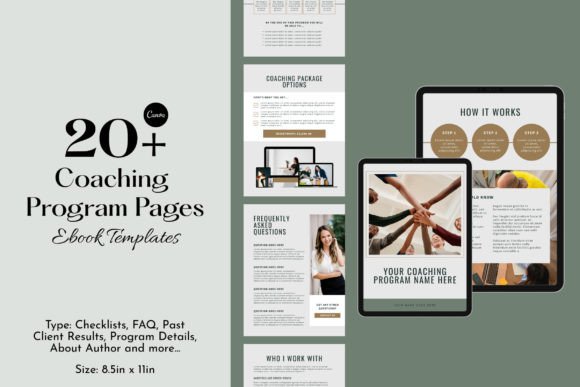
The Coaching Program Templates | Canva Ebook is designed to address this exact challenge. It’s a collection of over 20 ready-to-use page templates, created in Canva, that you can customize to fit your brand and program. Think of it as a design system for your coaching materials. Instead of starting from scratch each time, you have a structured set of pages—program details, FAQ sections, past client results, about the author, checklists, and more—that you can edit, rearrange, and personalize. The visual style is clean, modern, and professional, with a focus on clarity and readability. It uses a balanced mix of sans serif font and serif font pairings, which helps create a clear visual hierarchy without feeling cluttered. The overall personality is approachable yet authoritative, making it suitable for coaches who want to convey trust and expertise.
Where These Templates Shine
One of the biggest advantages of this design asset is its versatility. Because everything is built in Canva, you’re not locked into a single format. You can use these templates to create digital guides for online programs, print-ready worksheets for in-person workshops, or even social media graphics to promote your coaching services. The templates are also ideal for editorial design—think creating a branded ebook or a lead magnet that looks like it was designed by a professional. For coaches who are also building a brand identity, these templates help maintain consistency across all your materials, from your program workbook to your Instagram posts. The ability to edit colors, fonts, and images means you can align everything with your existing brand guidelines, reinforcing recognition and professionalism.
Making It Your Own
What sets this template pack apart is its focus on customization. You’re not just getting a static PDF; you’re getting a fully editable Canva file. This means you can adjust the typography to match your brand’s voice—maybe swap in a script font for headings or use a handwritten font for a more personal touch. You can add your own images, move elements around, and even delete sections that don’t apply to your program. This level of flexibility is crucial because it allows you to create materials that feel genuinely yours, not just a generic template with your name slapped on it. For coaches who are also entrepreneurs or small business owners, this means you can produce high-quality content quickly, freeing up more time to focus on your clients and your business growth.
Practical Tips for Implementation
When you start working with the Coaching Program Templates | Canva Ebook, take a little time to plan your customization. First, gather your brand assets—your logo, color palette, and preferred fonts. Then, go through each template and decide which sections are most relevant to your program. For example, if you have a lot of client testimonials, you might expand the “Past Client Results” section. If your program is highly structured, you might use the checklists and program details pages as your core. Don’t be afraid to experiment with font pairing. Canva makes it easy to try different combinations, so test a few options to see what feels right for your audience. Remember, the goal is to enhance readability and engagement, not to overcomplicate the design. A clean, consistent layout will always serve you better than a flashy but confusing one.
Beyond the Basics: Building a Cohesive Experience
Think of these templates as more than just pages—they’re part of your client’s journey. When a client receives a beautifully designed workbook or guide, it sets the tone for their entire experience with you. It signals that you value quality and attention to detail, which can significantly boost their perception of your program. This is where modern typography and thoughtful design come into play. By using a consistent typeface and layout, you create a sense of cohesion that makes your materials easier to follow and more enjoyable to use. Whether you’re designing a logo for your coaching brand or creating a set of worksheets, the principles are the same: clarity, consistency, and professionalism. And because these templates are designed with commercial font considerations in mind, you can use them confidently in your business without worrying about licensing issues.
In the end, the right tools can make all the difference. The Coaching Program Templates | Canva Ebook isn’t just about saving time—it’s about elevating the way you present your coaching program. It’s about creating materials that reflect the care and expertise you bring to your work. And with everything editable in Canva, you have the freedom to make it uniquely yours. So if you’ve been struggling to organize your coaching materials, this might just be the solution you’ve been looking for.