Design Your Story: A Custom Bookmark Template Guide
There is a specific kind of satisfaction that comes from marking your place in a book with an object you made yourself. It connects you to the material in a way a dog-eared page or a scrap of paper never could. For designers, crafters, and entrepreneurs, this desire for a personal touch is the foundation of countless projects. But translating that idea into a polished, professional product requires more than just a good concept; it requires the right tools. This is where a versatile Bookmark Template, Custom Bookmark bundle becomes an indispensable part of your creative arsenal, offering a structured starting point that saves time while unlocking boundless creative potential.
Beyond the Basics: The Anatomy of a Versatile Bookmark Template
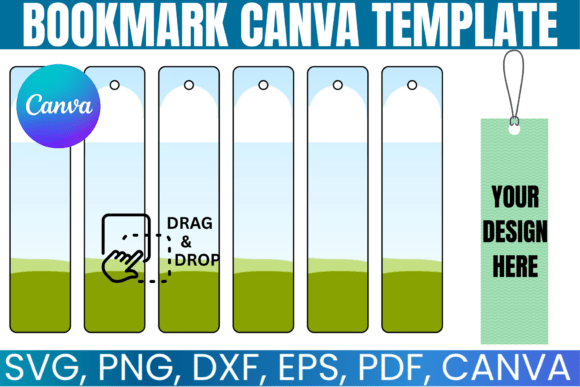
At its core, a high-quality bookmark template is a blank canvas engineered for efficiency. Think of it as the skeletal framework of a design asset. The visual characteristics are intentionally minimal—a clean, crisp outline with precise dimensions—allowing your vision to be the primary focus. Its "personality" is defined by its neutrality and adaptability. It doesn't impose a style; it absorbs yours. The overall appeal lies in its professional grade. The lines are clean, the corners are perfectly rounded (or squared, depending on the variant), and the file structure is optimized for a seamless workflow, eliminating the frustration of poorly constructed design files.
This particular bundle’s strength is in its comprehensive file inclusion. Providing SVG files for vector-based cutting machines like Cricut and Silhouette is non-negotiable for serious crafters. The inclusion of a DXF file broadens that compatibility further. For print-focused projects, the PDF with a solid white background offers a ready-to-print solution, while the PNG with a transparent background is perfect for digital mockups or layering in complex designs. The most accessible entry point, however, is the Canva link. This feature democratizes the design process, allowing anyone with a browser to engage in professional-level customization without needing a steep learning curve or expensive software subscriptions. It’s a practical approach to modern typography and design, meeting creators where they are.
From Memorial Keepsakes to Brand Extensions: Real-World Applications
The true value of a custom bookmark template is measured in its application. Its versatility stretches far beyond a simple reading aid for personal use. Consider a small business owner launching a new product line. A beautifully designed bookmark can serve as a tangible brand extension, slipped into packaging as a thank-you note or a discount code carrier. It’s a piece of packaging design that customers are likely to keep and reuse, keeping your brand top-of-mind far longer than a disposable flyer.
For authors, publishers, and bloggers, these templates are a cornerstone of editorial design and marketing. A bookmark featuring a compelling quote from your book, your author website, and a QR code to your newsletter is a powerful marketing tool for book signings, library events, or mailing to advance readers. In the realm of social media graphics, a mockup of a custom bookmark makes for a visually engaging post to announce a new release or a giveaway. The possibilities extend to personal milestones as well. Creating a set of memorial bookmarks for a loved one’s funeral or a celebration of life service offers a deeply personal and lasting keepsake for attendees, a far more thoughtful gesture than a standard program.
A Practical Guide to Customization and Design Strategy
Simply having the template is the first step; using it effectively is the next. Your approach will differ based on your end goal and the platform you choose. Whether you are a seasoned designer using a vector program or a hobbyist using Canva, a few principles remain constant.
Choosing Your Platform and Planning Your Design
For those comfortable with software like Adobe Illustrator, Inkscape, or CorelDraw, the SVG file is your best friend. It allows for infinite scaling without loss of quality, giving you total control over every stroke and curve. This is ideal for creating a truly unique piece of logo design or intricate typographic layout. For Silhouette users, the DXF file integrates directly. If your goal is a quick, beautiful design for print or digital sharing, the Canva link is the most efficient path. Before you begin, sketch out your idea. What is the primary message? Who is the audience? This clarity will guide your choices in imagery, color, and, most importantly, typography.
Mastering Typography and Hierarchy
A bookmark is a small canvas, which makes visual hierarchy critical. You have only a few square inches to make an impact. Your choice of typeface will do the heavy lifting. A bold, clean sans serif font for a main title or quote can convey modern strength and clarity. Paired with a delicate script font or a classic serif font for a subtitle or author name, you create a dynamic and professional font pairing. Consider the personality of the font. A handwritten font might be perfect for a cozy, personal project but could undermine the professionalism of a corporate brand. The goal is to choose a creative font that aligns with the project's tone, ensuring readability at a small scale.
From Digital File to Physical Object
The final step is bringing your design to life. If you are using the PDF or PNG files for printing, pay close attention to your printer settings and paper choice. A heavier cardstock will lend a more premium, durable feel. For those using cutting machines, the process is about precision. The clean lines of the SVG template ensure your machine cuts a perfect shape every time, which is the hallmark of a professional-looking DIY project. Always do a test cut on a scrap piece of material to calibrate your blade and pressure settings before committing to your final project. This simple step prevents wasted materials and frustration, ensuring your final custom bookmark is exactly as you envisioned.
Ultimately, this Bookmark Template, Custom Bookmark bundle is more than just a collection of files. It is a gateway to creating tangible, meaningful objects. It provides the structure, you provide the creativity. Whether you are building a brand identity, marketing a publication, or crafting a heartfelt gift, these templates empower you to produce a polished and professional result with confidence.