Custom Planner Stickers: The Canva Editable Advantage
Why Static Stickers No Longer Work for Modern Creatives
If you have ever spent twenty minutes scrolling through Etsy or Pinterest looking for the perfect planner sticker, only to realize the colors clash with your current spread or the font is too whimsical for your professional goals, you understand the limitation of static design assets. We have all been there. You buy a PDF, print it, and realize it just doesn't fit the specific aesthetic you are building for the week or the specific branding you are trying to maintain in your business planner.
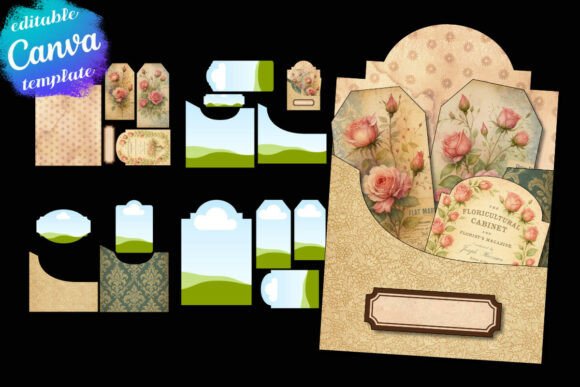
Enter the concept of the Canva Editable Planner Sticker. This isn't just a printable file; it is a design template system. These assets are built specifically within Canva, meaning they utilize the platform's intuitive drag-and-drop interface to give you total control over the final output. We are talking about a shift from passive consumption to active creation. Instead of settling for a pre-made design, you are using a framework to build something that feels bespoke to your needs.
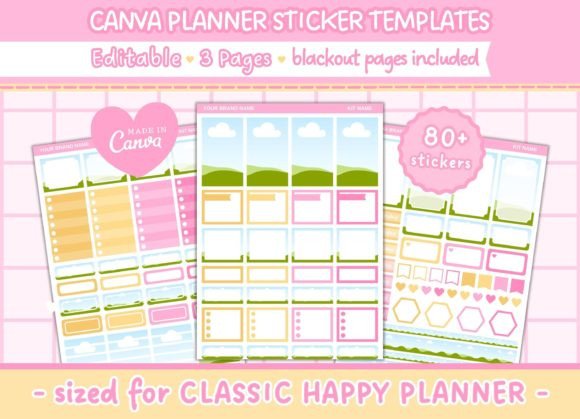
The specific templates we are looking at today are designed with a "Classic Happy Planner" dimension in mind—specifically sized at 6.75 x 9.25 inches. This is a crucial detail for anyone in the planning community. It eliminates the guesswork of scaling and ensures that when you print and cut, the dimensions align perfectly with the standard vertical or horizontal layouts of the most popular planners on the market.
Deconstructing the Asset: Functionality Meets Flexibility
From a design perspective, the value of a template lies in its structure. These particular templates come as a set of 3 pages, offering enough variety to cover a weekly spread without becoming repetitive. But the real magic—and where your inner designer or brand strategist comes in—is the editability.
Because these are created in Canva, you have access to the full suite of modern typography tools. Are you a blogger trying to match your planner stickers to your website’s brand identity? You can change the text to match your brand voice. Do you need a specific font pairing that uses a sans serif font for headers and a clean serif font for body text? You can upload your own premium font files to Canva and apply them directly to the sticker templates. This turns a simple sticker sheet into a piece of editorial design.
Furthermore, the visual customization goes beyond text. You can adjust backgrounds, apply textures, or even upload your own photography to use as fills within the sticker shapes. This is particularly useful for content creators and marketers who might be using their planners as part of a flat-lay photography setup for social media graphics. The ability to control the color palette ensures that your planning tools are cohesive with your wider visual strategy.
The Technical Edge: Precision for Cutting Machines
One of the most frustrating aspects of DIY sticker printing is the cutting process. If you have ever tried to fussy-cut stickers with scissors, you know it lacks the polished, professional look of a die-cut sticker. This is where the technical specifications of these templates shine.
The files include blackout pages for use with cutting machines. For those using a Cricut or Silhouette, this is a non-negotiable feature. The blackout layer provides the high-contrast registration marks that optical sensors need to read precisely. This ensures that your cuts are clean and accurate, regardless of the complexity of the sticker shape.
Additionally, the sizing is optimized for specific hardware. The full-size boxes are 1.5″ x 2.5″. This is a standard, functional size for a "classic" sticker—it’s large enough to write a to-do list item or a meal plan, but small enough to fit three across in a standard vertical planner column. The consistency of the 1.5″ x 2.5″ grid creates a visual rhythm on the page, which is essential for visual hierarchy and readability.
Strategic Applications for Business and Personal Use
How does this translate to real-world value for a small business owner or entrepreneur? Consider the concept of packaging design or logo design consistency. If you are a product-based business, you can use these templates to create branded "to-do" stickers for your own workflow, or even create printable freebies for your customers. By customizing the colors to match your brand identity, you create a cohesive unboxing or user experience.
For the crafter or hobbyist, the value lies in the ability to create a creative font showcase. You can experiment with different typeface styles—perhaps a script font for a feminine touch or a bold display font for headers—without committing to buying an entire font family first. It serves as a testing ground for your creative projects.
Practical Guidance: Making the Most of Your Editable Stickers
To get the best results from a Canva Editable Planner Sticker set, you need to approach it like a design project, not just a printing task. Here is how to maximize the asset:
- Evaluate Your Project Fit: Before you start editing, look at the layout. Does the 1.5″ x 2.5″ box size actually work for your handwriting size? If you write large, you might find the space restrictive. If you write small, it might be perfect for concise task lists.
- Focus on Readability: When changing the text, stick to legible sans serif fonts for small details. While a handwritten font looks beautiful on a screen, it can become difficult to read when printed at a small scale on a sticker.
- Test Your Font Pairings: If you are customizing the headers, ensure the weight of the font balances the visual weight of the sticker design. A very thin, delicate font might get lost against a bold background color.
- Commercial Licensing: If you plan to sell printed versions of these stickers, you must verify the license of the original template and any fonts or graphics you upload into Canva. Most templates for personal use do not automatically grant commercial font or asset rights for resale.
Ultimately, these templates bridge the gap between a generic printable and a custom design asset