Unwrap Creativity: Using a Chocolate Bar Wrapper Template in Canva
There is a unique satisfaction in holding a finished design, especially when it transforms something ordinary into something deeply personal. A chocolate bar is more than just a sweet treat; it is a vessel for celebration, gratitude, and brand messaging. Yet, creating a custom sleeve from scratch involves precise measurements and printer calibration that often frustrates even seasoned designers. The Chocolate Bar Wrapper Template - Canva collection eliminates this technical guesswork. It provides a structured, pre-measured canvas where your creativity can flow without worrying about bleed lines or paper dimensions.
These templates are designed with a clean, professional aesthetic that serves as a blank slate. They are not cluttered with pre-made graphics that fight for your attention. Instead, they offer a balanced visual weight, ensuring that when you add your typography or imagery, it sits perfectly within the physical constraints of the candy. The style is utilitarian yet polished, bridging the gap between a raw design asset and a finished commercial product. Whether you are a small business owner looking to create branded merchandise or a crafter making party favors, the template acts as a reliable foundation for your packaging design.
Mastering the Dimensions: Sizes for Every Occasion
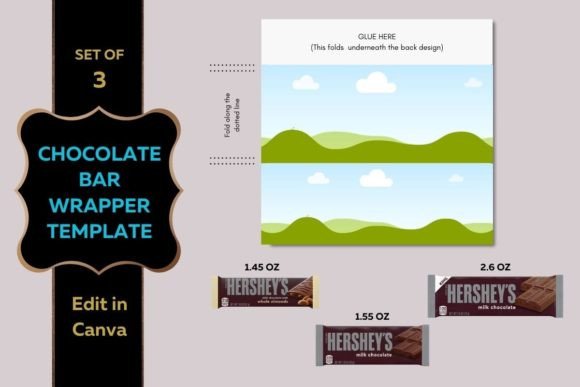
One of the primary challenges in DIY packaging is the variance in product sizes. A design that fits a standard bar will look sloppy on a miniature treat. This collection addresses that directly by offering distinct templates formatted for three specific candy dimensions: 1.45 oz, 1.55 oz, and 2.60 oz. This range covers the most common retail sizes, ensuring your design is tight and professional, regardless of the candy bar you choose to wrap.
Understanding the size hierarchy helps in decision-making. The 1.45 oz wrapper is compact, ideal for quick promotional handouts or wedding favors. The 1.55 oz size is the classic standard, perfect for broad marketing campaigns. The 2.60 oz bar offers a larger canvas, allowing for more detailed editorial design elements, ingredient lists, or complex illustrations. Because the Digital Chocolate bar wrapper template is formatted to fit an 8.5×11-inch sheet of paper, you can print these at home or in any standard office environment without resizing headaches.
The Canva Advantage: Simplifying Design Execution
Choosing to edit in Canva brings a layer of accessibility to this project that traditional desktop software cannot match. Canva’s interface is intuitive, allowing users to manipulate layers, upload brand assets, and apply text effects with ease. This is particularly useful for marketers and entrepreneurs who need to produce high-quality visuals quickly. You do not need to be a vector graphics expert to achieve a polished result.
The templates are built to support modern typography trends. You can easily swap the default text for a premium font or a script font to match the tone of your event. For a corporate gift, a clean sans serif font paired with a serif font creates a sophisticated contrast. For a child’s birthday party, a playful handwritten font adds warmth. The flexibility of the platform means your brand identity remains intact, whether you are designing for a boardroom meeting or a casual gathering.
Strategic Applications for Professionals and Hobbyists
The utility of a Chocolate Bar Wrapper Template - Canva extends far beyond simple gift-giving. For content creators and bloggers, these custom wrappers serve as exceptional props for flat-lay photography or video backgrounds, adding a branded touch to visual content. Publishers might use them as unique promotional mailers to send to book reviewers, creating a memorable unboxing experience that stands out in a crowded inbox.
For designers, these files are an excellent addition to a library of design assets. They provide a practical lesson in packaging design constraints—teaching how to work within specific dimensions and how to account for the curvature of the paper when wrapped around the product. Consider using these templates for:
- Product Launches: Create sample packaging concepts to present to clients before investing in professional printing.
- Event Marketing: Design wrappers that align with trade show themes or seasonal campaigns.
- Personal Projects: Craft personalized messages for holidays, graduations, or baby showers.
- Web Design & Social Media: Generate mockups to showcase your logo design skills on confectionery items.
Design Tips for High-Impact Wrappers
To ensure your final product looks professional, focus on visual hierarchy and readability. The front panel of the wrapper is prime real estate. Place your main message or logo here, ensuring it is legible even from a distance. Use high-contrast colors; for example, a gold script font on a dark chocolate background creates a luxurious feel, while bright primary colors suggest fun and energy.
When you edit in Canva, pay attention to the margins. While the template is sized for paper, you must leave a small buffer for the glue or tape that holds the wrapper together. Do not place critical text too close to the edges. Test your font pairing by printing a draft on plain paper first. This "dry run" allows you to check the scale of your text against the physical candy bar. Sometimes, what looks balanced on a computer screen can feel cramped on a 1.45 oz wrapper.
Finally, consider the paper stock. Standard printer paper can look thin and tear easily. For a more professional finish, use a heavier cardstock or matte photo paper. This adds rigidity and makes the colors pop, elevating the perceived value of the treat inside. Whether you are a hobbyist exploring creative font styles or a brand strategist refining a campaign, the combination of the right template and thoughtful execution ensures your message is received as sweetly as the chocolate itself.