Celebrate Dad with a Custom Canva Frame
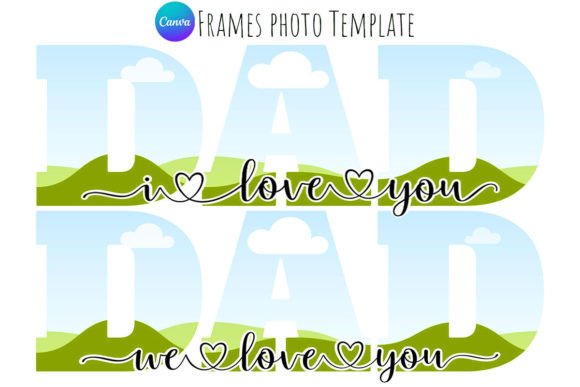
Creating a heartfelt tribute for Father's Day often involves finding the perfect image, but presenting that image with the right context and style is what truly makes it memorable. The Happy Father's Day DAD Canva Frame is a specialized design asset built specifically for this purpose. It is not a static image file that you have to edit in complex software like Photoshop; rather, it is a dynamic, drag-and-drop template designed to work seamlessly within the Canva ecosystem. This distinction is vital for anyone looking to create professional-looking graphics without a steep learning curve. Whether you are a small business owner wanting to thank the father figures in your client base, a blogger creating seasonal content, or a hobbyist making a digital card for a family member, this template offers a practical solution.
Understanding the Visual Appeal and Structure
The core personality of the Happy Father's Day DAD Canva Frame relies heavily on its composition. Typically, these frames feature a floral wreath or a thematic border that surrounds a central transparent area. This central layer is the "frame" itself—it is where your chosen photograph will sit. The visual style often balances sentimentality with clarity. You might find elements like typography that mimics a handwritten font or a bold display font for the words "DAD," paired with softer visual elements like leaves, tools, or abstract shapes. The overall appeal is versatility; because the central layer is transparent, the frame adapts to the photo you place inside it, whether it is a candid shot of a father and child or a stylized portrait.
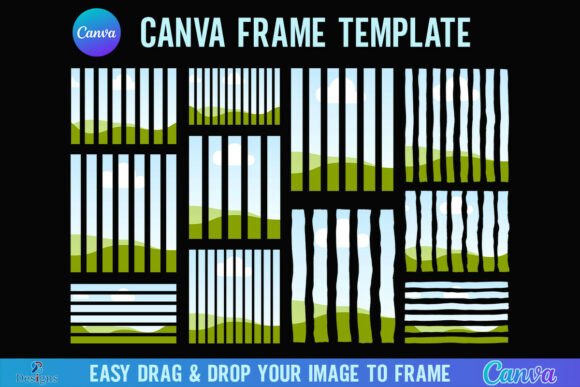
From a technical perspective, the file is delivered as a PDF link, which is a standard and secure way to share Canva templates. Once you click the link, the template opens directly in your Canva account. This is where the "drag-and-drop" functionality comes into play. You do not need to manually adjust clipping masks or layer order in a complicated way. The design assets are pre-arranged. The user simply uploads their image to Canva, drags it onto the template, and Canva’s interface automatically places the image into the designated frame area. This process preserves the integrity of the original design—keeping the typography crisp and the decorative elements aligned—while allowing for infinite customization of the central image.
Strategic Applications for Creators and Businesses
For the marketer or entrepreneur, the utility of the Happy Father's Day DAD Canva Frame extends beyond personal use. Father’s Day is a significant commercial event, and social media graphics play a massive role in how brands connect with audiences during this time. Using a pre-designed frame ensures that your content looks polished and intentional, which contributes to brand perception and professionalism. Instead of posting a raw photo, which can sometimes feel disjointed in a curated feed, wrapping it in a thematic frame signals to your audience that your brand pays attention to detail and participates in cultural moments.
Consider a few practical scenarios where this asset shines:
- Social Media Campaigns: Create a series of posts featuring different team members' fathers or customer spotlights. The consistent use of the frame creates visual hierarchy and brand consistency across the campaign.
- Digital Invitations: If you are hosting a Father’s Day brunch or a community event, using this frame for the invitation graphic adds a layer of modern typography and festive flair without requiring custom illustration work.
- E-commerce Packaging or Inserts: For small business owners selling physical products, you could print a version of this frame (adjusted for size) as a thank-you insert for orders placed in June.
The fact that the template features transparent layers makes it particularly useful for vinyl sublimation. If you are a crafter or hobbyist, you can resize the frame to fit mugs, t-shirts, or tote bags. The transparency ensures that the background of your physical product shows through, or that you can place a solid color behind the design in the editing phase to match specific merchandise. This flexibility is a hallmark of high-quality creative font and graphic resources—they adapt to the medium rather than forcing the medium to adapt to them.
Design Principles: Hierarchy, Readability, and Pairing
When you open the Happy Father's Day DAD Canva Frame, you are working with a pre-established visual hierarchy. The designer of the template has already made decisions about the weight and placement of the text relative to the image. As a user, your primary job is to ensure your photo complements this hierarchy rather than fighting it. For example, if the frame features a bold, dark border, choose a photo with good contrast so the subject doesn't get lost. If the typography is delicate, avoid a photo that is overly busy or noisy in the area where the text overlaps.
While the template handles the main design work, understanding font pairing is useful if you decide to customize the text. If the template uses a script font for "Happy Father's Day," you might want to add a secondary line of text, like a date or a location. In this case, pairing the script with a clean sans serif font is usually a safe bet. The sans serif acts as a supporting role, providing readability without competing for attention. Conversely, if the template uses a strong serif font, adding a light sans serif for supplementary information maintains a balanced aesthetic. The goal is to maintain the professionalism of the original design while personalizing it.
Practical Tips for Customization and Licensing
Before you dive in, a few practical considerations will save you time. First, always check the commercial font licensing if you plan to use the design for business purposes. While Canva’s free elements are generally available for commercial use, some Pro elements have specific restrictions. The template description should clarify whether the assets used are free or premium within Canva. Second, take advantage of Canva’s "Position" and "Filter" tools. If your photo is slightly too bright for the frame's text, applying a subtle filter or adjusting the transparency of an overlay can improve readability.
Finally, do not be afraid to experiment with the resize feature. A square frame designed for Instagram can often be adapted into a vertical story format or a horizontal banner for a website. Because the Happy Father's Day DAD Canva Frame is a vector-based template (in the sense that the text and shapes are editable), scaling it up or down usually preserves quality better than a static JPG. This adaptability makes it a valuable part of any designer's toolkit for seasonal campaigns, ensuring that you can deliver high-quality, engaging content that resonates with your audience and honors the occasion effectively.