4 Tumbler-Rotating Tumbler Canva Mockup: A Designer's Toolkit
Creating a professional product presentation for custom drinkware often requires complex 3D software or expensive photography setups. The 4 Tumbler-Rotating Tumbler Canva Mockup bundle changes this dynamic entirely. It provides a set of realistic, customizable templates designed specifically for Canva, allowing anyone to generate high-quality visuals without a steep learning curve. This isn't just a static image; the rotating tumbler mockup creates a dynamic, engaging view of your product from multiple angles.
Understanding the Core Components and Visual Style
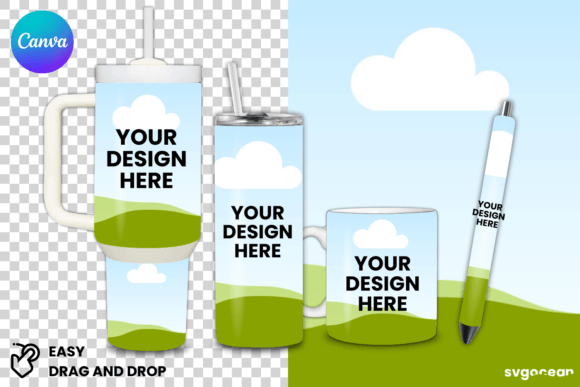
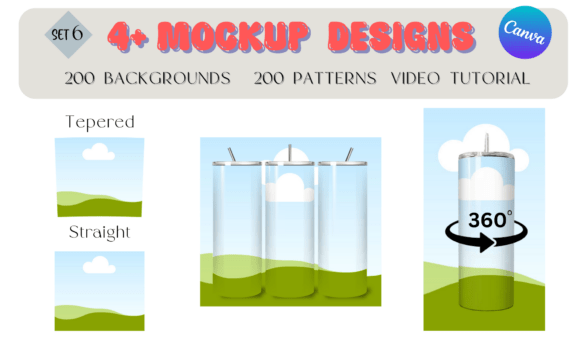
At its heart, this package is a collection of design assets built for practicality and visual impact. The four distinct tumbler mockup templates offer different perspectives and styles, giving you variety for your presentations. Each template is crafted to look photorealistic, with attention to light, shadow, and reflection that mimics a real studio photograph. The personality of these mockups is clean, modern, and highly versatile. They don't impose a strong stylistic opinion on their own, which is their greatest strength. They act as a neutral, professional stage for your own designs.
The true value extends beyond the four core templates. The inclusion of 200 bonus backgrounds is a strategic addition for any content creator or small business owner. Instead of spending hours sourcing or creating suitable settings for your product shots, you have immediate access to a library of options. These can range from solid colors and subtle gradients to lifestyle textures like marble or wood, allowing you to tailor the mood to your brand identity. Furthermore, the 100 leopard/zebra patterns and 100 marble patterns are not just random graphics. They are curated design assets ready to be applied directly to the tumbler within the mockup. This allows for instant visualization of how a pattern would look on the finished product, which is invaluable for designers testing concepts or entrepreneurs validating ideas before production.
Where This Mockup Bundle Truly Shines
The applications for this Canva-editable tumbler mockup are broad, spanning both digital and physical realms. For graphic designers and brand strategists, it's a rapid prototyping tool. You can quickly mock up logo design concepts or pattern applications on a tangible product, presenting clients with realistic visuals that aid in decision-making. This elevates a simple flat design into a contextual piece of packaging design, showing how the brand identity translates to a physical item.
For marketers and social media managers, the rotating aspect is pure gold. A static image is good, but a short, looping video or GIF of a tumbler gently rotating catches the eye in a crowded social feed. This bundle empowers the creation of that engaging content directly within Canva, a platform most already use. You can create stunning social media graphics for product launches, seasonal promotions, or customer testimonials, all featuring a professional-looking product shot.
Small business owners and crafters on platforms like Etsy or Shopify will find this particularly useful. It solves a major pain point: presenting handmade or print-on-demand items professionally. Instead of inconsistent phone photos, you can create a cohesive and polished look for your entire product line. The drag-and-drop functionality means you don't need any technical design skills. You simply upload your artwork, position it on the smart object layer, and the mockup does the rest. This consistency is key to building a recognizable and trustworthy brand identity.
Practical Guidance for Implementation
Getting the most out of this bundle involves a few straightforward steps. First, access is exclusively through Canva. You'll need a Canva account (the free version works, though Pro offers more assets). The video tutorial included is your best starting point. It walks you through the exact process of using the drag-and-drop feature, changing backgrounds, and applying the included patterns. Watching this once will save you time and unlock the full potential of the templates.
When choosing which of the four mockups to use, consider the story you want to tell. A tumbler shown straight-on might be best for showcasing a detailed wrap-around design. A slight angle, as offered by the rotating mockup, adds dynamism and a sense of realism, as if the customer is holding it. Test different backgrounds from the 200 provided. A clean, solid color might let a complex design pop, while a lifestyle background (like a desk or a kitchen counter) helps the customer visualize the product in their own life.
The patterns are a fantastic resource for experimentation. Don't just use them as-is. Within Canva, you can adjust the scale, rotation, and even the color of these patterns to create unique variations. This is where you move from using a template to engaging in true editorial design for your product line. For commercial use, the licensing is typically straightforward for this type of digital asset, allowing you to use the final mockup images for your business, marketing, and sales channels. Always double-check the specific license terms included with your purchase, but for creating web design elements, online store listings, and digital advertisements, you are generally covered.
Ultimately, the 4 Tumbler-Rotating Tumbler Canva Mockup is less about the mockup itself and more about the workflow it enables. It democratizes professional product visualization. It removes technical barriers and cost prohibitions, allowing a focus on what matters: the design, the branding, and the story you want to tell about your product. For anyone selling or designing custom tumblers, it's a practical, efficient, and valuable addition to your toolkit.